Adding post lists and grids to your Site couldn’t be easier than with the WP Show Posts plugin. Dispatch uses the Free version to display posts on the Front page and in the Sidebars. Of course with a little Flint Skin CSS treatment.
Head off to Dashboard > WP Show Posts > All Lists. Within are six lists:
- Align
- Standard
- Sidebar
- Header
- Simple
- Simple Sidebar
Each of them have very particular settings required to match the demo content you see here. Changing those settings may affect the way the post is displayed, and not necessarily for the better. So please work on a duplicate or make a note before changing.
Note: the name of the List has no relevance to the different styles displayed.
General ( and important ) information
Before we go into the detail let’s cover some basic and very important information.
Advanced Settings
For the purpose of the demo content a couple of the Lists are using Advanced Settings. First off the Standard List is using Ascending Order (Default: Descending). Secondly the Simple List is using Offset, so it omits the first 4 posts. You may want to put these back to default if you’re not intending to replace them.
Duplicating WP Show Posts List
So we have four lists, and we want to make a new Standard list with a different category. The easiest way is to use one of the Duplicate Post plugins in the WordPress repository. Simple hey. And it works for all post types including GP Elements. Awesome. Note: When making a duplicate you are generally given two options. Clone and New Draft. I advise using the New Draft as some people have reported issues when using Clone.
List: Standard
This is the standard WP Show Post list that has the same custom styling applied to the GP Blog:

Listado final de propuestas que cumplieron requisitos y subsanaciones en el marco de la Convocatoria 2023 del SUE D.C.
La Subdirección de Gestión de Proyectos CIUP, invita a la comunidad académica a conocer el Listado Final de Propuestas que cumplieron requisitos y subsanaciones en el marco…
A Sample Post with Comments
Lorem ipsum dolor sit amet, consectetur adipiscing elit, sed do eiusmod tempor incididunt ut labore et dolore magna aliqua. Ut enim ad minim veniam, quis…

Aside for Widgets
Sidebar Widgets are a main feature of any Magazine Blogging site. To aid with that Dispatch uses a nifty little plugin and a couple of…
Style Guide
Heading One H1 Heading Two H2 Heading Three H3 Heading Four H4 Heading Five H5 Heading Six H6 Font: Playfair Playfair is a transitional design….
How to change the Custom Colors
Changing Colors in Dispatch are mainly done via the Theme Customizer. Certain elements such as Page Heros are controlled within the Header Element and are…
This is how the list is displayed within the Content area just by adding the WP Show Post Shortcode. Here follows the basic styling changes that have been made.
Content Wrap (WPSP Only)
Using a custom Hook Element the Post article content is now wrapped within a DIV container. This container carries a class of wpsp-content-wrap for styling. This wrap is present on all WP Show Posts that are output inside Dispatch.
Featured Image
The featured image has a fixed height to match the layout. This is achieved using this CSS:
.generate-columns-container article .inside-article img,  .wp-show-posts-image img {
    height: 180px;
    width: 100%;
    -o-object-fit: cover !important;
    object-fit: cover !important;
}
You can edit the height property to suit, or remove the CSS it entirely if you want to use your own sizes.
Meta above title
This is achieved using a flex box on the Entry Header. Again this applied to the GP Blog:
.generate-columns-container article .entry-header, .wp-show-posts-entry-header {
    display: -webkit-box;
    display: -ms-flexbox;
    display: flex;
    -webkit-box-orient: vertical;
    -webkit-box-direction: reverse;
    -ms-flex-direction: column-reverse;
    flex-direction: column-reverse;
}
Entry Title forced to 2 lines
The entry title always displays a minimum and maximum of 2 lines. This mantains the across row alignment. Again this is applied to GP Blog. The ex unit is used to define the number of lines visible. The lines are set by defining the line-height and setting the height to as many mutiples as you require lines. e.g up the height to 7.5ex will create three lines.
.generate-columns-container article .entry-header .entry-title, .wp-show-posts article .wp-show-posts-entry-title {
    line-height: 2.5ex;
    height: 5ex;
    overflow: hidden;
    text-overflow: ellipsis;
}
List: Align
Designed for a single column list this displays the content the image to the left and content to the right. This is subtly different to just resizing the image in the WP Show Posts list settings and aligning it left. Thanks to the Content Wrap we added (above) the content will never wrap around the image. On mobile it just stacks.
To add one of these your posts requires a little markup. And is done like so:
<div class="wpsp-align">shortcode_goes_here</div>Listado final de propuestas que cumplieron requisitos y subsanaciones en el marco de la Convocatoria 2023 del SUE D.C.
La Subdirección de Gestión de Proyectos CIUP, invita a la comunidad académica a conocer el Listado Final de Propuestas que cumplieron requisitos y subsanaciones en el marco de la Convocatoria 2023 de proyectos de investigación y semilleros del SUE D.C. Consulte el Listado Final de Propuestas que cumplieron requisitos aquí:http://ciup.upn.edu.co/publicacion-de-propuestas-que-cumplieron-requisitos-y-subsanaciones-en-el-marco-de-la-convocatoria-2023-de-proyectos-sue-d-c/

Invitado especial al V Encuentro Nacional de Semilleros de Investigación en Educación en Ciencias y Educación Ambiental
Es oficial, el 22 de abril la UPN recibirá al Dr. Diego Armando Retana Alvarado de la Universidad de Costa Rica, quien será conferencista central en el V Encuentro Nacional de Semilleros de Investigación en Educación en Ciencias y Educación Ambiental a desarrollarse en las instalaciones de la UPN Calle 72 en la Facultad de Ciencia y Tecnología, Licenciatura…
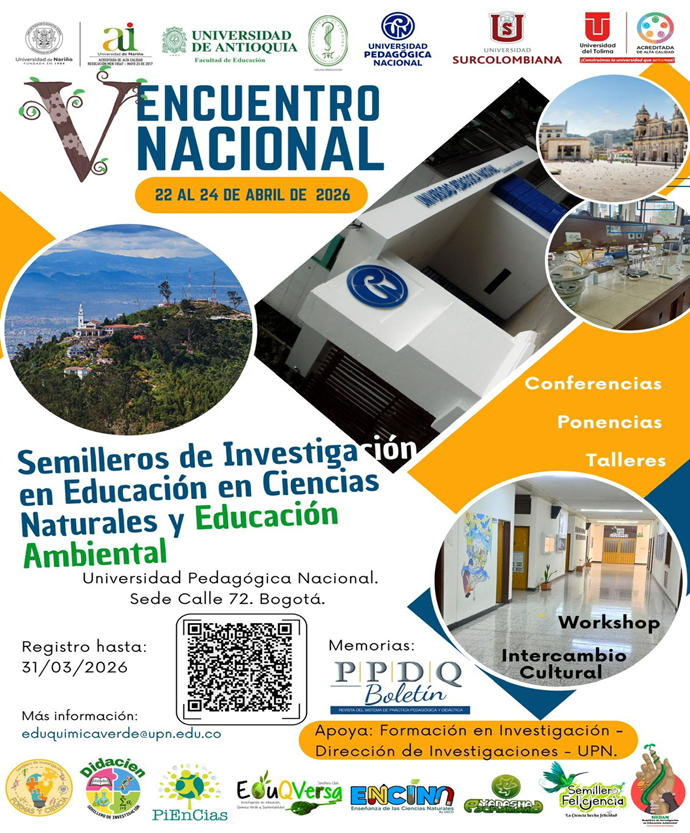
V Encuentro Nacional de Semilleros de Investigación en Educación en Ciencias Naturales y Educación Ambiental.
La Dirección de investigaciones invita al V Encuentro Nacional de Semilleros de Investigación en Educación en Ciencias Naturales y Educación Ambiental. Este evento se consolida como un escenario académico de alto nivel, diseñado para propiciar el diálogo entre semilleros, docentes e investigadores en torno a los retos actuales de la enseñanza científica y la sostenibilidad. El encuentro se…
Lists: Sidebar
In the right had sidebar you can see the Sidebar list. This List is set to 1 column and only displays the Featured Image, Title and Category. This is designed for Widgets, a narrow column or as part of a grid (like in our next List).
To add this style the Widget requires a CSS Class of:
wpsp-cardDispatch comes with Widget Classes Plugin installed. This provides this function.
List: Header
The Header list as seen on the Front Page requires a list containing only 5 posts. And can accomodate most of the content elements. Which are only displayed on the large leader post.
To add this style the Header Element requires the following element classes:
wpsp-grid wpsp-cardList: Simple
This is output using the wpsp-card inserted into a containing DIV like so:
<div class="wpsp-card">shortcode goes here</dib>
List: Simple Sidebar
Nothing fancy here, just a list being output using the a Widget in the sidebar.

 Facebook
 Instagram
 LinkedIn
 TikTok
 X
X Youtube